ProtectPLC Desktop Agent
The lightweight Windows sync agent that auto-uploads your PLC files to the cloud. Set it up once and your programs stay protected automatically.
Free download. Requires a ProtectPLC account to activate.
Everything you need to protect your PLC programs
Built for industrial automation engineers who need reliable backup and change tracking.
Automatic PLC File Backup
Watches your project folders and automatically uploads new or changed PLC files to secure cloud storage.
Folder Watching & Auto-Sync
Configure folders to monitor and the agent syncs changes in real-time without manual intervention.
Version History & Rollback
Every file change creates a new version you can browse, compare, and restore at any time.
Change Notifications
Get email alerts when someone modifies your PLC programs so unauthorized changes never go unnoticed.
Visual Diff Comparison
See exactly what changed between versions with clear side-by-side comparison of file contents.
Multi-Vendor PLC Support
Works with Rockwell, Siemens, Mitsubishi, Omron, Schneider Electric, and 20+ other vendors.
Supported PLC Vendors
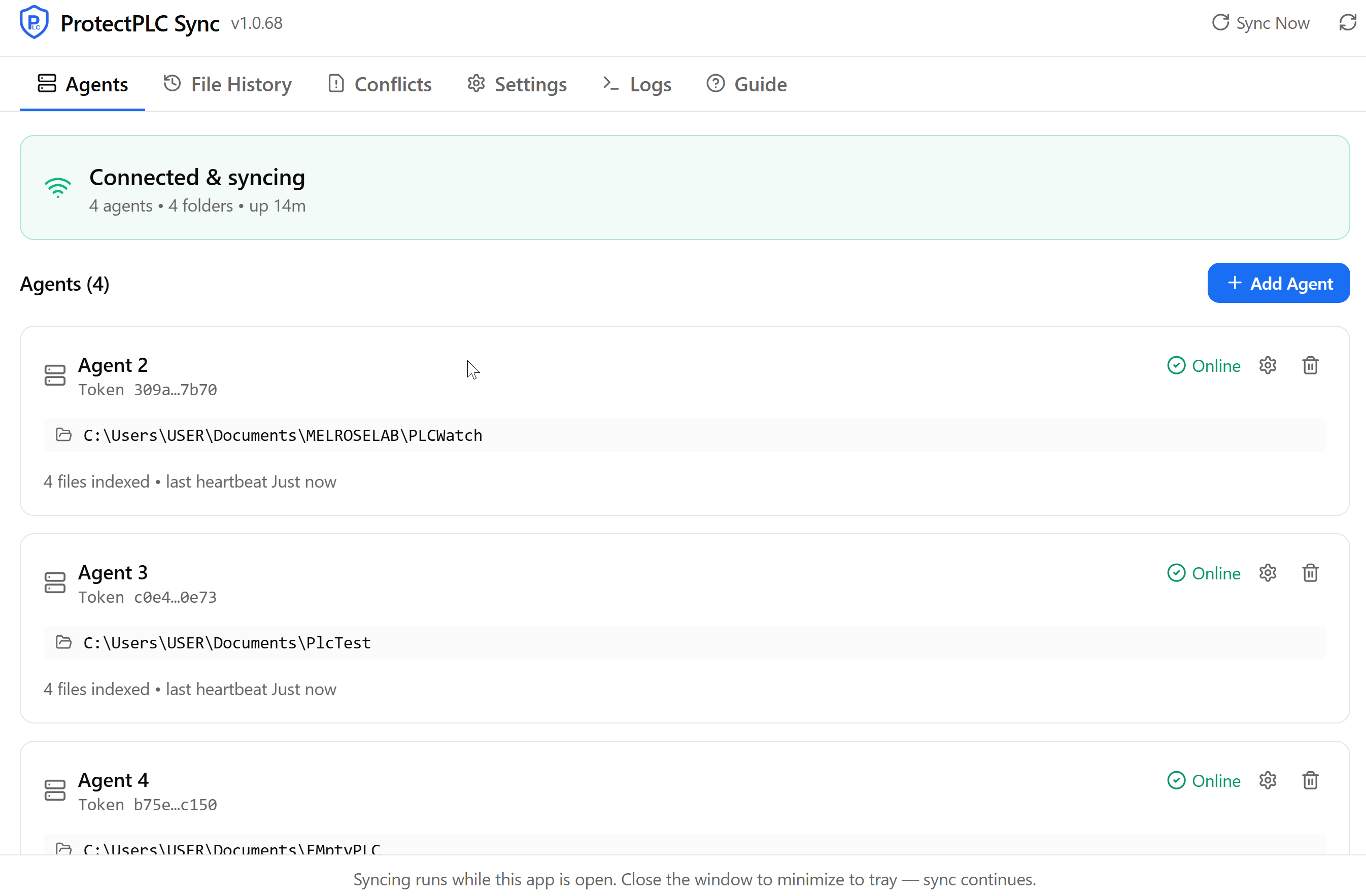
Simple, powerful interface
System Requirements
| Component | Requirement |
|---|---|
| Operating System | Windows 10 64-bit or later (Windows 11 supported) |
| Memory | 4 GB RAM minimum |
| Disk Space | 500 MB available disk space |
| Network | Broadband internet connection (required for sync functionality) |
| Service | ProtectPLC Desktop Agent Windows Service must be running for sync and file-watching features |
Get started in 5 minutes
Estimated setup time: 5 minutes
Download the installer
Click the download button above to get the ProtectPLC-Setup.exe file.
Run the installer
Double-click the installer and follow the prompts (administrator privileges required).
Sign into your ProtectPLC account
Enter your ProtectPLC credentials to connect the desktop agent to your cloud workspace.
Configure watched folders
Select the folders containing your PLC project files to begin automatic monitoring.
Verify your first sync
Make a small change to a file and confirm it appears in your ProtectPLC dashboard.
Set up the Desktop Sync Agent
Five short steps: install, register, add the agent, keep it always-on, and confirm it's online. The whole thing takes about two minutes.
Download & install ProtectPLC Desktop
One Windows app watches your folders and auto-uploads PLC files. No command line. If you used the old command-line client, this replaces it automatically.
Run ProtectPLC-Setup.exe and follow the prompts. It installs to your user account — no admin needed for a basic install.
Updating is one click
Already have ProtectPLC installed? Just download the newest installer and run it — it updates in place and remembers your agents and folders. No need to close the app or stop anything first.
Installing ProtectPLC Desktop…
Stopping the sync agent so files can be updated…
Register an agent & copy its token
Each workstation runs its own agent with its own token. Create one here — you'll paste the token into the app next.
Agent name
Site
Give the agent a clear name (e.g. Line 1 PLC — Willy) and pick its site. You'll get a one-time token that looks like:
Copy it now — for security it's only shown once. You can always regenerate it later from the agent's page.
Register an agentAdd the agent in the app
Open ProtectPLC Desktop, go to the Agents tab, and click Add Agent. Paste the token and choose which folder(s) to back up.
Agent token
Paste the token you copied in step 2.
Watched folders
Click Add folder and pick each folder that holds your PLC exports (e.g. C:\PLCBackups\Line1). Add as many as you like.
Then click Add agent — it connects within a few seconds. Repeat for as many workstations as you need; each agent keeps its own token and folders.
Agent token
Watched folders
Keep it syncing 24/7 (recommended)
So your files stay protected even when the app window is closed or the PC reboots.
In the app's Settings tab:
- Run on Windows Startup — opens the app automatically when you log in.
- Install Service (approve the admin prompt) — a background service keeps every agent syncing even when the app is closed, and starts on boot.
Closing the window just minimizes to the system tray — syncing continues either way.
Confirm it's online
On the Agents tab each agent shows its real name and a green Online badge once connected.
Agent 3 — Line 1 PLC
5 files indexed · last heartbeat just now
Agent 4 — Packaging
12 files indexed · last heartbeat just now
File History & version compare
Every upload is kept as an immutable revision. Open the File History tab, pick a file, and compare any two revisions side by side — a GitHub-style diff that highlights exactly what changed.
Conflicts, handled safely
If the same file changes in two places, nothing is overwritten. The Conflicts tab lets you keep your local changes or take the server version — both copies are always preserved until you choose.
Line1.L5X
Version conflict · 2m ago
Frequently asked questions
How do I update to a newer version?
Download the latest installer from the Downloads page and run it. It updates in place, keeps your agents and folders, and picks up syncing automatically — nothing to close or reconfigure.
Do I need to run the installer as Administrator?
No, a normal install works. Administrator is only needed once if you choose Install Service for always-on background syncing, and the app asks for it with a prompt at that moment.
Where do I get the agent token?
On the Sync Agents page, click Register Agent. The token is shown once — copy it, then paste it into the desktop app when adding the agent.
Can one PC run more than one agent?
Yes. Add multiple agents in the app, each with its own token and its own watched folders. Each shows separately with its real name (e.g. “Agent 3”).
What file types are backed up?
PLC project and export files in your watched folders (e.g. Rockwell L5X, Siemens exports, Beckhoff/Codesys). New or changed files upload automatically within seconds; the app also re-scans every minute as a safety net.
Does closing the window stop syncing?
No. Closing minimizes to the system tray and syncing continues. If you enabled the background service, syncing also continues after a reboot without opening the app.
How do I see what changed between two versions?
Open the File History tab, select a file, choose two revisions in the Compare panel, and click Compare changes for a line-by-line diff.
How do I add or remove watched folders later?
In the desktop app's Agents tab, click the gear on an agent to edit its folders. You can also manage folders from the agent's page on the website.
Note: Administrator privileges are only needed if you choose to install the always-on background service — not for a basic install or for updates.
Account required: After installation, you must sign into your ProtectPLC account to activate the software and enable sync features.
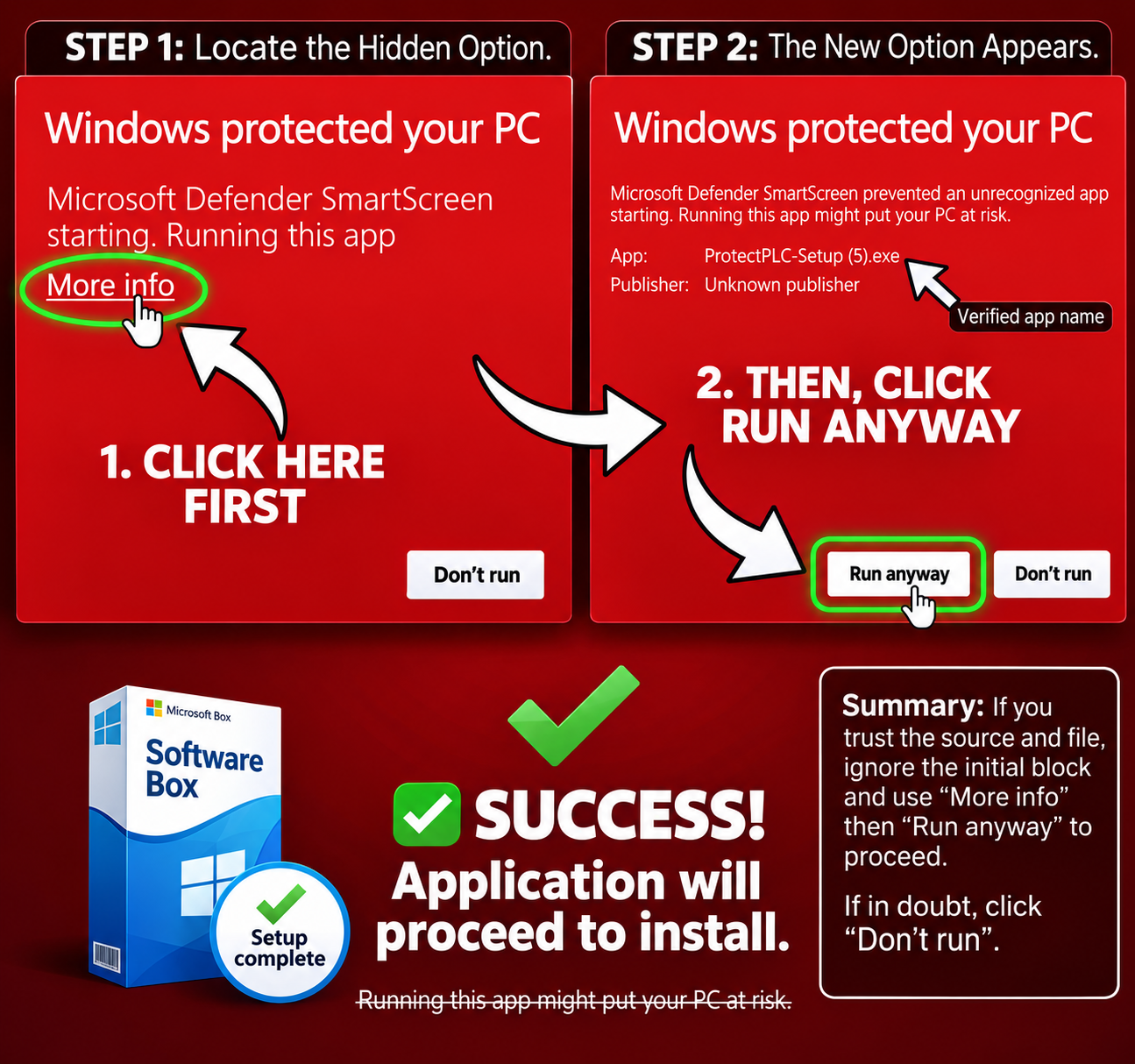
Windows SmartScreen Notice
Windows may show a SmartScreen warning when you first run the installer. This is normal for new software and does not mean the file is unsafe. Our installer is digitally signed and virus-free. Simply click "More info" and then "Run anyway" to proceed.
Safe & Secure Download
Virus-Free Verified
Scanned by Windows Defender & VirusTotal
HTTPS Secure Download
Encrypted connection protects your download
Digitally Signed
Certificate by DigiCert
Choose the right plan
The sync agent download is free. Pick a plan to activate backup and sync features.
Free
$0/mo
1 device, up to 5 backups, no sync agents
Starter
$99/mo
Up to 20 assets, 5 sync agents
Professional
$299/mo
Up to 75 assets, 10 sync agents
Enterprise
$699/mo
Up to 200 assets, unlimited sync agents